
Why Bing Says a URL Can Be Indexed but It’s Not Showing in Search?
Seeing “URL can be indexed” in Bing Webmaster Tools feels like good news, until you search for your page and it’s nowhere to be found. If your site is Bing indexed but not showing in search, you’re dealing with two separate stages: getting crawled and actually appearing for a query. A page can pass Bing’s accessibility check and still need work before it ranks anywhere useful.
Here’s what’s really going on, and how to fix it:
What “URL Can Be Indexed” Actually Means?
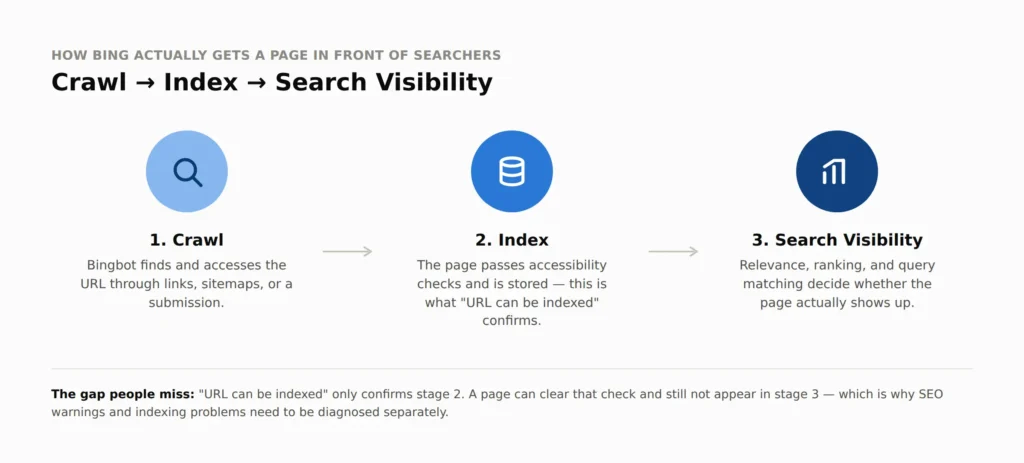
When Bing Webmaster Tools says a URL can be indexed, it simply means the page passed Bing’s basic accessibility checks. It does not mean the page is guaranteed to appear immediately, rank for your target keywords, show up for every relevant query, or that every SEO recommendation has been met.
Indexing and visibility are related, but they’re not the same thing. Bing gives you separate tools for URL inspection, SEO issues, sitemap status, and submission, and each one tells you something different. If you’re troubleshooting a new site or a recently published article, keep that distinction in mind before you panic over one confusing status message.
SEO Warnings Aren’t the Same as Indexing Blocks
Bing often flags issues like a short title, a meta description that’s too long or short, or missing page elements. These are worth fixing, but they rarely explain why a page is indexed but not showing in search.
A vague title like “Home” tells Bing (and users) almost nothing. Something like “Emergency Plumbing Services in Houston | ABC Plumbing” gives real context. Aim for 30 to 65 characters, focused on clarity rather than hitting a specific character count.
The same logic applies to meta descriptions. A stuffed line like “Plumbing plumber Houston plumbing services best plumber Houston” reads as spam. A better version explains the actual value: “Get professional emergency plumbing services in Houston for burst pipes, leaks, and urgent repairs.” Microsoft recommends roughly 120 to 165 characters. Neither of these fields acts as an on/off switch for indexing, so don’t rewrite them chasing a number.
The Real Checklist When a Page Still Won’t Show Up
If your titles and descriptions are solid and the page is still missing from search, look further down the technical stack:
- Robots.txt – confirm it isn’t blocking Bingbot from the page or a key section of your site.
- Noindex tags – check the page’s HTML for an accidental noindex directive.
- Canonical tags – make sure they point to the version of the URL you actually want indexed.
- HTTP status – the page should return a clean, successful response, not a redirect or error.
- XML sitemap – confirm the URL is included and the sitemap itself is reachable.
- Internal links – link the page from related content so Bing can discover it naturally.
- Content quality – a good title won’t rescue thin or duplicate content.
IndexNow can speed up discovery when you publish or update a page, but it’s a notification, not a ranking shortcut. If there’s an underlying canonical, noindex, or content problem, resubmitting the URL repeatedly won’t fix it.
It’s also worth remembering that “indexed” and “showing in search” aren’t identical. A page can be processed by Bing and still miss a specific query, which doesn’t necessarily mean it fell out of the index.
Final Thoughts
If your page is indexed but not showing in search, don’t assume a title or meta description warning is the culprit. Fix those because they’re good practice, then investigate indexing separately: start with URL Inspection, check robots.txt, noindex, canonicalization, HTTP status, sitemap, and internal links, and confirm the content is genuinely useful. If working through that checklist feels like more than you want to take on alone, our SEO specialists’ team can run the full technical audit and fix what’s blocking your visibility. Once the technical foundation is solid, Bing’s submission and monitoring tools can help the rest catch up.